How StepLoom AI works
Follow one real run, step by step
218.1 s from the first click to a finished demo.
You click through the app once
StepLoom Recorder saves a clean picture of every screen you click.
- What went in
- Your clicks in the app.
- What came out
- A draft demo with one step for each click.
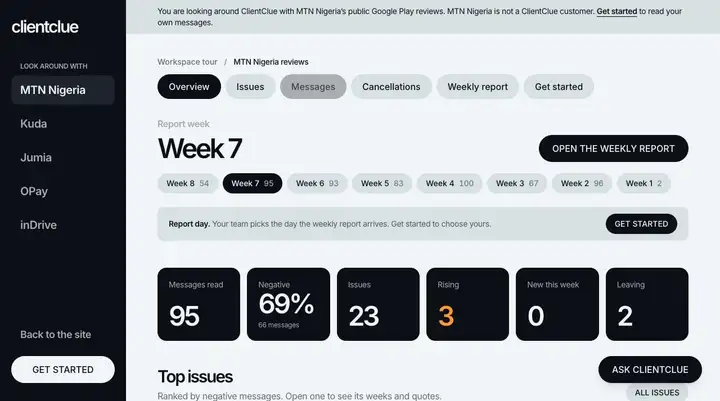
8
Steps recorded
24.0 s
Time to record
How each run on this site was captured
Filter MTN Nigeria's reviews by language and feeling in ClientClue Made with the StepLoom Recorder
Recorded with the StepLoom Recorder in Chrome: every click became a step with its picture and click spot, and private details were checked before anything was saved.
Read MTN Nigeria's weekly report in ClientClue on an iPhone Made from a phone recording
Recorded on an iPhone 17 Simulator (iOS 27, Safari) with the Simulator's own screen recorder (1206 by 2622 pixels, 70 seconds). The taps were sent through the Simulator's accessibility controls, so the video shows no touch marks. StepLoom Phone Steps found the screens in the browser and placed the click spots.
Explore AbujaMart's real orders in SheetScope Made from uploaded screenshots
Screens captured in Chrome by an automated browser, with the click points recorded, then uploaded to StepLoom (Upload screenshots).
Read MTN Nigeria's reviews in ClientClue's workspace tour Made from uploaded screenshots
Screens captured in Chrome by an automated browser, with the click points recorded, then uploaded to StepLoom (Upload screenshots).
StepLoom AI reads every screen
Each screen is read for its title, its buttons and what was clicked.
- What went in
- The pictures, in the order you clicked.
- What came out
- What is on each screen, in words.
Click Messages
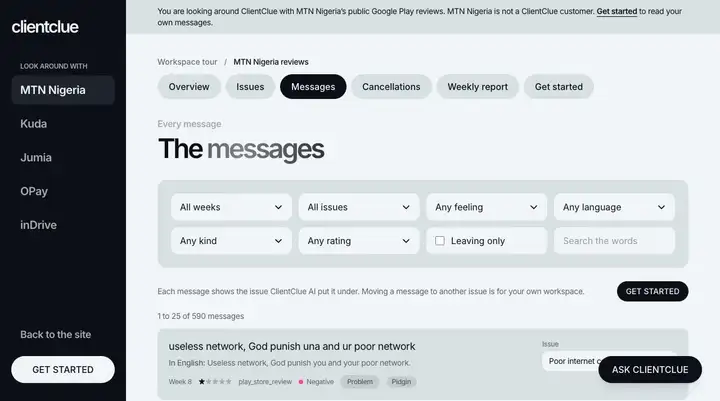
Click Any language
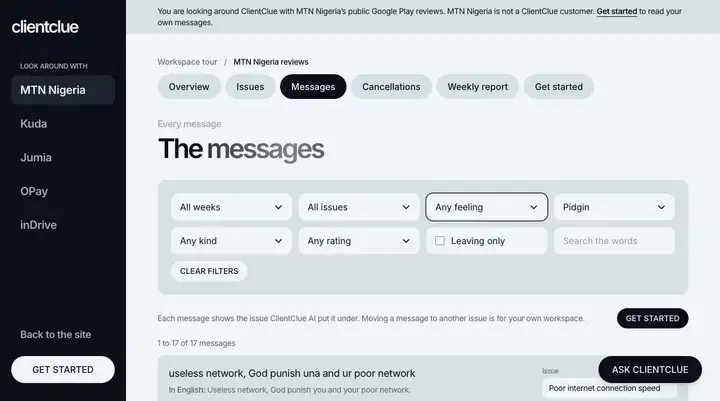
Select Any feeling
The click spot goes where the click was
The spot is placed on the button. Where the position is unclear, it is checked against the screen.
- What went in
- Where the click landed, and the screen.
- What came out
- A click spot on every step.
3 of 3
Click spots placed on the right button
A caption for every step
StepLoom AI writes a short title and one plain line.
- What went in
- The screen, what was clicked and the page name.
- What came out
- Captions you can change.
- 01
Click Messages
Click Messages to view individual customer reviews and feedback for MTN Nigeria.
- 02
Click Any language
Select the language dropdown to filter customer reviews by the language they were written in.
- 03
Select Any feeling
Filter the customer reviews by sentiment to see how users feel about the service.
Private details are covered
A second reading finds card numbers, emails, phone numbers, bank account numbers, ID numbers, names and balances and draws a box on each.
- What went in
- Every screen, after the Recorder's own cover.
- What came out
- Boxes you can turn off or move. They are baked in when you publish.
0
Covered by the StepLoom Recorder
0
Found by StepLoom AI
Every caption in the languages you choose
Each caption is translated, keeping buttons and names as they appear on screen.
- What went in
- Your captions.
- What came out
- A translation for each language, marked as edited once you change it.
Spanish
Haz clic en "Messages"
Haz clic en "Messages" para ver las opiniones y comentarios individuales de los clientes de MTN Nigeria.
Haz clic en "Any language"
Abre el menú desplegable de idioma para filtrar las opiniones de los clientes según el idioma en el que se escribieron.
7 languages in this run
A voice for each step
A spoken clip is made for each step and packed small.
- What went in
- The captions in each language.
- What came out
- Audio you listen to before you share.
English, step 1
8 clips, 64.6 s of speech
Small enough for any connection
Covers are drawn in, then each picture is made in three small sizes with a tiny preview.
- What went in
- The full-size pictures.
- What came out
- A demo whose real size you can read.
1.0 s
First screen on Regular 3G (750 kbps)
1.7 s
First screen on Slow 3G (400 kbps)
238 KB
Whole demo on a phone: page, player, styles and pictures
184 KB
Of that, the pictures
- Every step clicked through in 5.3 s on regular 3G (750 kbps), on a phone.
- The Pidgin voice adds 270 KB, on top, only for a viewer who plays it.
- The first screen needs 61 KB in all.
Measured on a 390 px wide phone screen with the network slowed down. The first screen is the first step's picture on screen. Every step was passed by pressing its click spot.
One link for everyone
A link, a preview picture and a player that opens in any phone browser.
- What went in
- The finished demo.
- What came out
- A share link you can send anywhere.
Two passes keep private details out
The Recorder covers on your computer first. StepLoom AI reads again for what was missed. You review the boxes before you share.
Nothing here is a mock-up. Every number is from a run you can open.
Frequently asked questions
- It reads your screens, writes captions, places click spots, hides private details, translates and makes voices. You can change every result.
- No. StepLoom AI proposes. You decide what to keep.
- In the European Union. The page about your data has the full list.
- Each stage shows its measured cost above when the run recorded one.